Getting started without development
Overview
This guide explains how to integrate with Adverteyes API and generate reports without dedicated development resources. Modern AI tools (such as Claude, Gemeni, or similar assistants) can automate the processing workflow by generating scripts, parsing API responses, and producing formatted reports for your target.
This approach allows non-developers, marketers, and operations teams to work with Adverteyes API outputs using AI-generated automation.
When to Use This Approach
Use this method if:
You do not have development resources
You need quick integration or proof-of-concept
Reports or data exports are required regularly
Your workflow is file-based (CSV, JSON, Excel, PDF, etc.)
You want automation without building a full application
Concept
Instead of writing software manually:
You provide instructions to an AI assistant.
The AI generates html page for you.
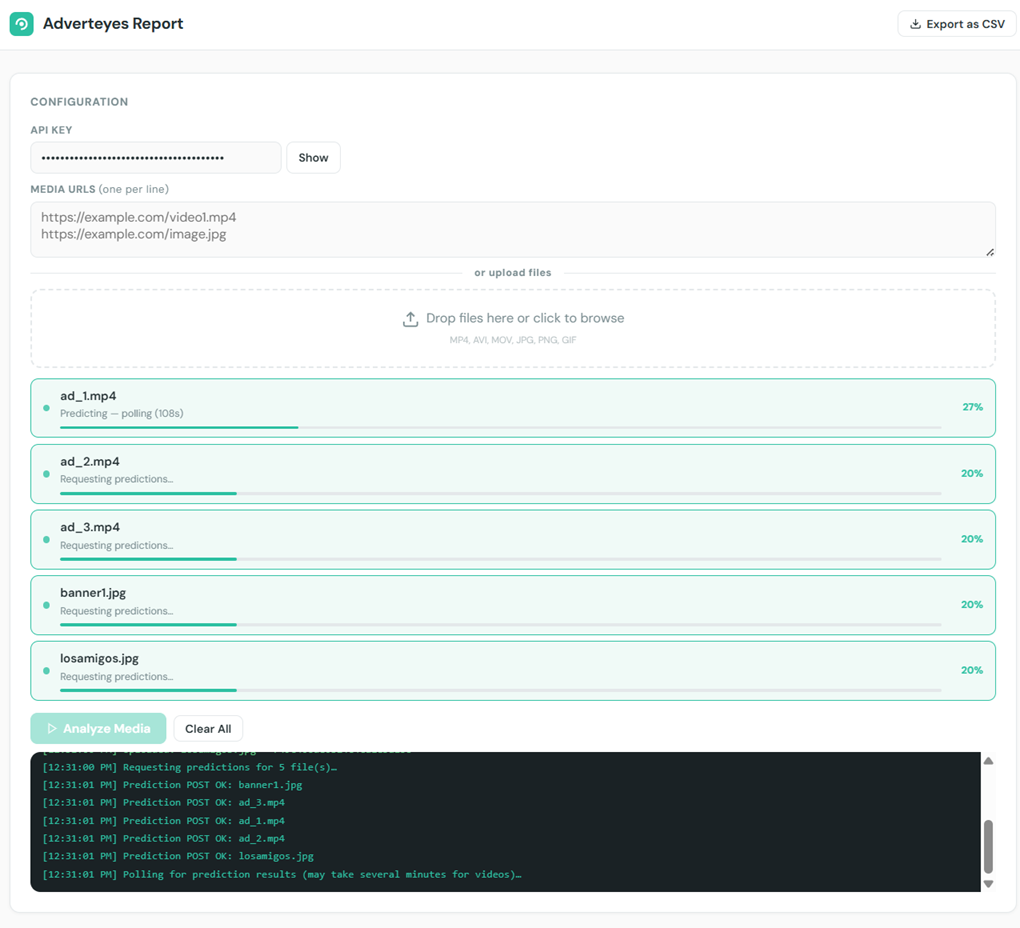
The page handles files upload and processing with use of the Adverteyes API.
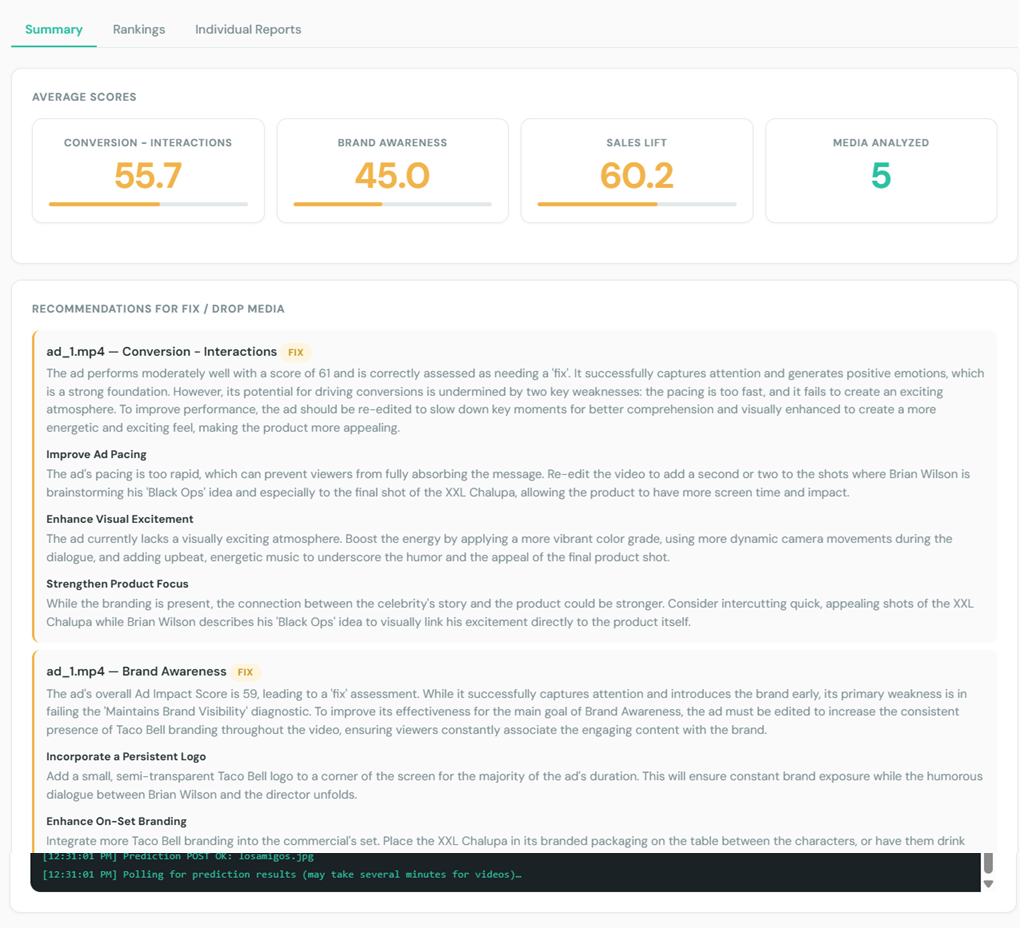
The page formats API Output data and presents it as html report with options to download it as csv
Prerequisits
Adverteyes API key (you can use demo key for testing)
Media Files (images or videos) what you want to process and generate reports for
AI assistant capable of generating scripts (for Example Claude)
Workflow
Step 1 — Prepare Your Goal
Define clearly:
What media files should be processed
What data you want extracted
Report target and format
Example:
I have 5 videos from last campaign, I want to analyze them and generate a report
I want to extract scores and lift for Sales Impact, Brand Awareness, and Interactions, and get recommendations for each media
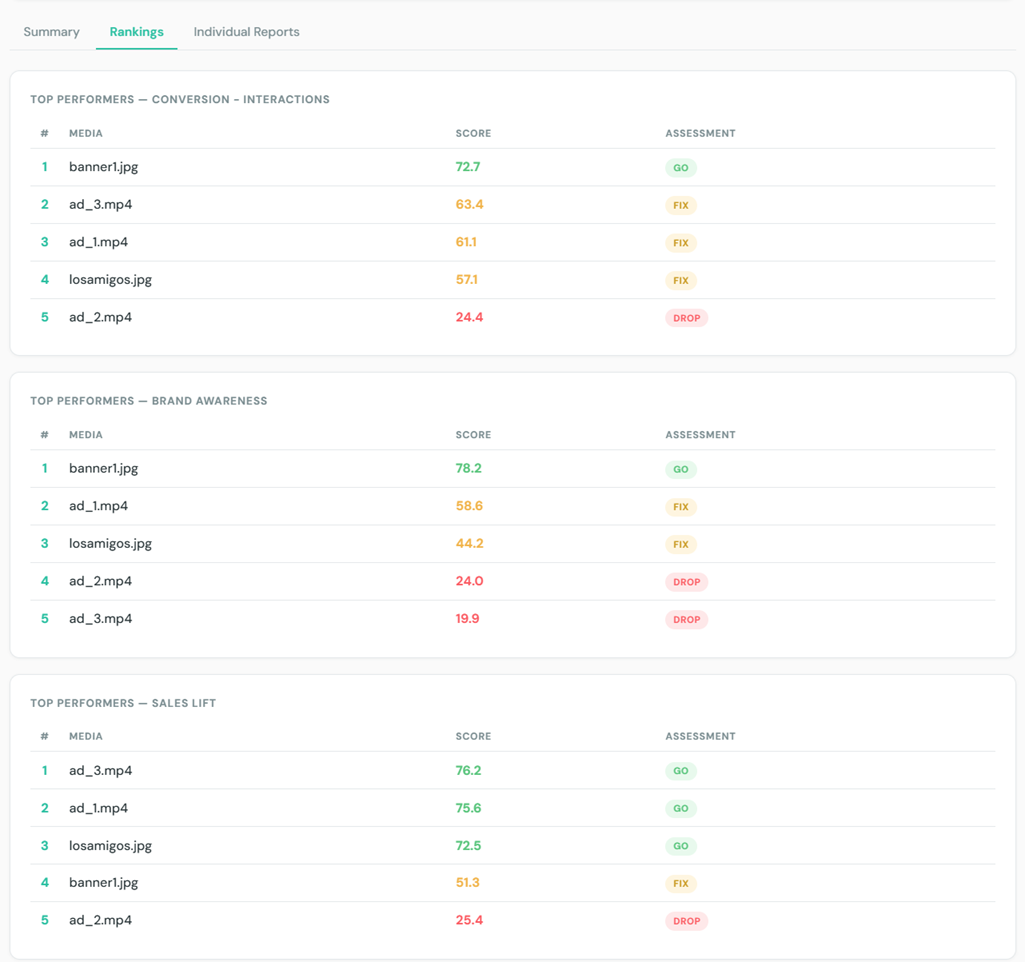
The report target is define top performance media in each category and provide recommendations for media with fix and drop assessment.
Step 2 — Ask AI to Generate target html page
Provide the AI system with:
API documentation
Expected output structure
Desired report format
Note: For security reasons, do not provide real API key in the prompt, use demo key or mention that it should be configurable for real key when running the script.
Example Prompt for AI System
Below is an example prompt you can send to Claude.
Example Prompt (to generate target Html page):
Could you generate for me html reports with help of Adverteyes API. Don't build it as react app, use html and javascript to be able run it directly in browser without any hosting

Source data:

make the main page of report accepting direct urls to media files or be able to handle files upload. and this links or files will be used as source data for report

API for processing:
To get data for reports, use the Adverteyes API.
The link to swagger UI is https://api.adverteyes.ai/swagger
The link to swagger json - https://api.adverteyes.ai/openapi.json
General documentation is https://api.adverteyes.ai/

API authentication:
The demo key for API is `demo-preview-api-key-2024-05-17-limited`
But make it configurable that I may pass real key before uploading my videos

Logic for data retrieval:
For the report please use results of scores from recommendations and recommendations itself.
POST requests after file upload can be done in parallel for files  in batches (max 10 files per batch). The logic of sending POST requests is:
 1. Send prediction reactions first
 2. after successful response of predictions - send POST for recommendations.
Processing videos may take a while - up to 10 mins, be sure that pooling results have enough room
Store retrieved results in cache if they are successful for not repeating data retrieval every time

Format of report:
The report format should be html file with all styles included, what I may open on laptop. Make clean and minimalistic but appealing visuals for data presentation
1 main/index file with total summary for all videos/images

Target of report:
for main file include 3 main scores "Sales Lift", "Brand Awareness" and "Conversion - Interactions" and highlight which medias are top performers in each category.
Use campaign_objective as names of the scores.
For media with fix and drop assessment display corresponding recommendations as well
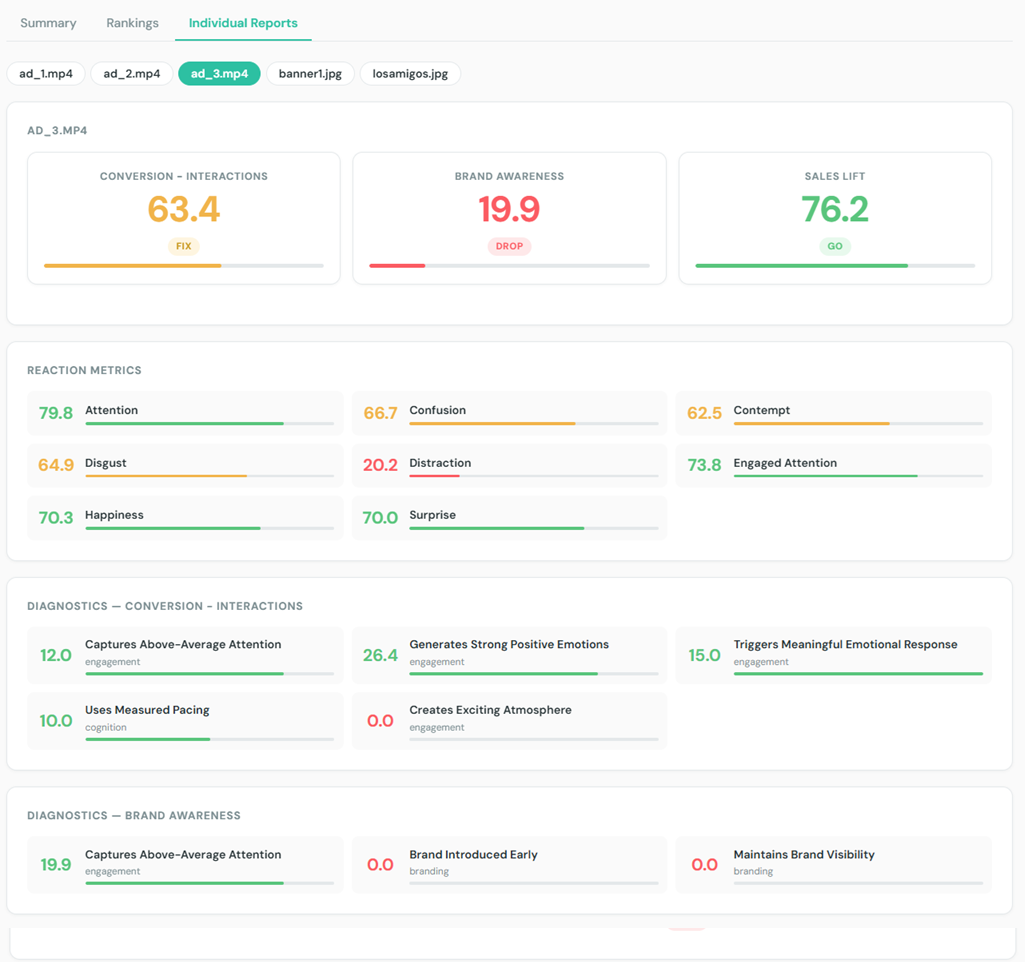
Also, provide individual reports per media including recommendations and all diagnostics data (individual reports can be created and stored as soon as data received).

Export data:
Add button "Export as CSV", to export all retrieved data in form of CSv

Add "Powered by Adverteyes" at every page. And use our brand colors :
background #fafafa, text #263235; lines and progress bar color #2DC0A2

cards background: #ffffff
scores: drop: '#FB5C63', fix: '#F1B44B', go: '#5AC57D'
Note: select proper model for the task, in case of Claude we are recommending to use one of Opus models to generate errorless script from first try
In the result of this prompt, you should receive a complete html page, what you able to open in your browser. The page will handle the API calls, data processing, and report generation as per your instructions.
In case of this example request we have received this output from Claude (Opus 4.6): Example report (html) Example report (zip)
Step 3 — Follow Instructions and Generate reports
The generated page will have instructions on how to use it, but generally you will need to:
Open the generated html file in your browser
Provide media files (either by uploading or providing URLs)
Wait for the processing to complete (the page will show progress)
View the generated report directly in the browser
Use the “Export as CSV” button to download the data if needed
Use the individual media reports for deeper insights and recommendations
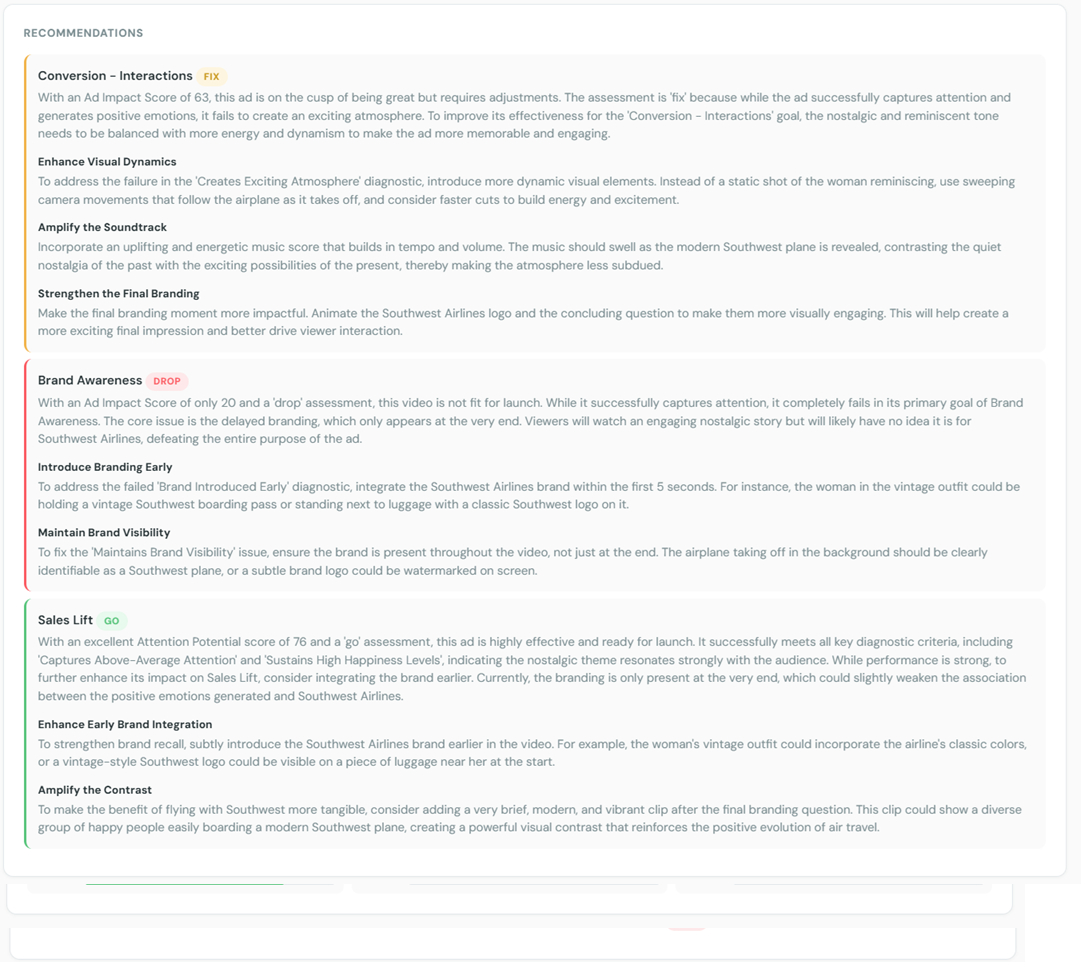
Here you can see examples of generated report below:
Conclusion
Even without development resources, organizations can successfully integrate with Adverteyes API by leveraging modern AI tools to:
Process API outputs
Produce structured reports
Enable operational workflows quickly
This approach democratizes access to AI insights, allowing marketers and operations teams to benefit from data-driven recommendations without needing to build custom applications.